
Why Is a Discount Applied at Checkout but Not Displayed in the Store?
If Shopify applies a discount at checkout but customers can’t see it on product cards or product pages, that usually means the discount is working (Shopify handled it) but something is preventing our app from showing it in the storefront. Below are the most common causes and exactly what to check .
1) Check the discount is Live in the app
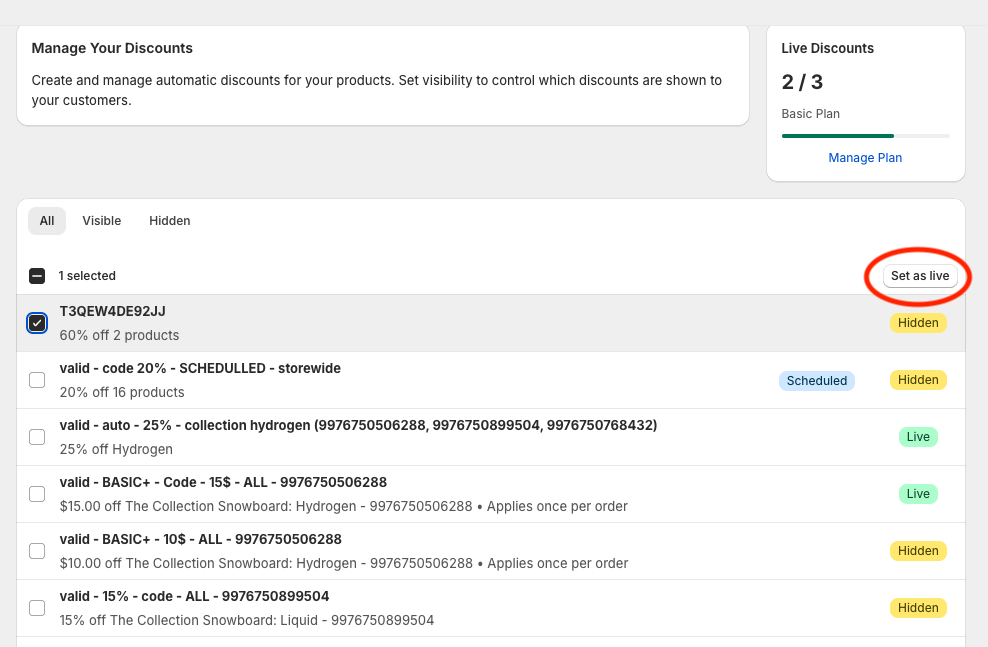
Even when a discount is valid in Shopify, it must be set to Live in Discounts Display Pro to be visible in the storefront.
Step-by-step
- In Shopify go to Apps > Discounts Display Pro > Manage Discounts.
- Find the discount in the list.
- If it’s marked Hidden, select it and click Set to Live.
- Refresh your storefront and check the product page/card.
2) Confirm this discount type is supported for display
Our app only displays product-level “amount off” discounts (percentage or fixed amount). Discounts that rely on cart/checkout context won’t be shown in the storefront, even though Shopify may apply them at checkout.
What we display
- Percentage off a product (e.g., 20% off)
- Fixed amount off a product (e.g., $10 off)
What is not shown (but still works in checkout)
- Discounts that depend on cart rules (e.g., Buy X Get Y, order-level discounts, free shipping, minimum-cart requirements, customer-segment restrictions, etc.)
If you’re unsure whether the discount type is supported, see: Supported Discounts & Exclusions.
3) Theme Compatibility & Selectors
If the discount is Live in the app and it’s a supported product discount, but it still doesn’t display, your theme may be preventing the badge or price update from rendering.
The app works out of the box with most common Shopify themes. Check our Supported Themes list.
If your theme is heavily customized or not on the list, app may need custom selectors to find the correct container to display the discounts
Step by step
- Try on a standard collection page—do any cards show discounts?
- If not, configure selectors in App > Settings > Advanced Theme Selectors. Follow the minimum requirements and HTML examples in Advanced Theme Support: Using Custom Selectors.
- Save and refresh your storefront.

Quick checklist (fast scan)
- ✅ Is the discount Live in the app?
- ✅ Is the discount a supported product amount off (percent or fixed)? — see Supported Discounts & Exclusions.
- ✅ If the discounts are live and from a supported type and still are not showing up in the storefront, check custom selectors / theme compatibility.
If you’ve gone through the steps above and the discount still appears at checkout but not on the storefront, please contact us via in-app chat or support@wizardformula.pt and we’ll help you troubleshoot.