
Managing Live Discounts
When you create a new discount in Shopify’s Discounts page, it will automatically be imported into the app. By default, every discount is set as hidden. This gives you full control over which promotions are actually displayed to your customers.
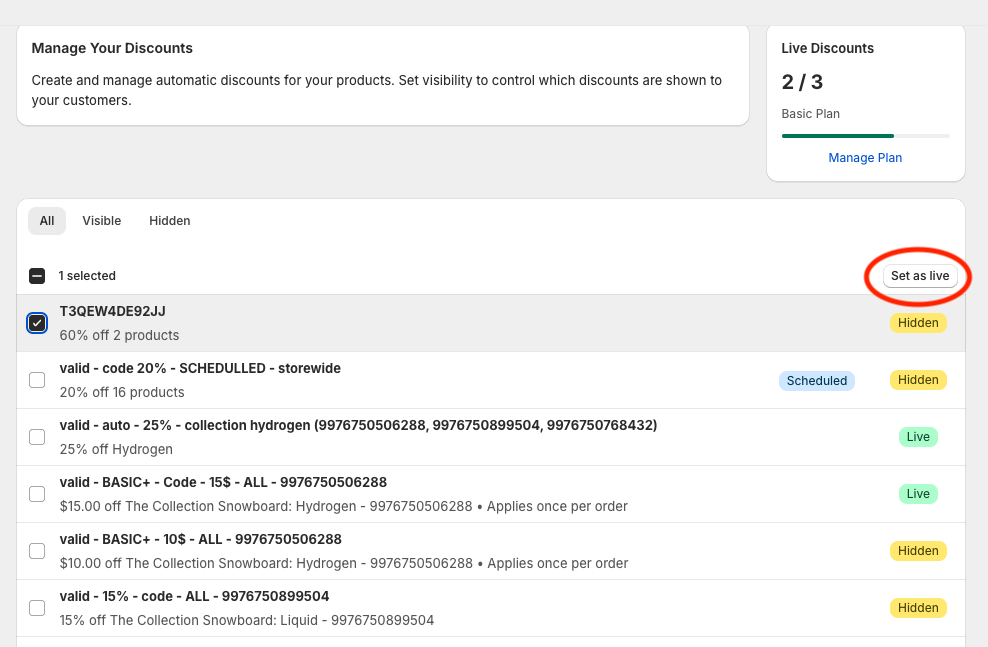
To make a discount visible in your storefront, you’ll need to enable it in the app’s Manage Discounts page :
- Go to Shopify Admin > Apps > Discounts Display pro > Manage Discounts
- Select the discount(s) you want.
- Click Set to Live.
Only discounts marked as live will appear on your storefront.
How Many Discounts Can Be Live?
The number of discounts you can set live depends on your plan:
- Free plan → 1 live discount
- Basic plan → up to 3 live discounts
- Advanced plan → unlimited
Why Not Make All Discounts Live?
There are situations where you might not want every discount visible. For example:
- Influencer or partnership campaigns → A unique code given only to people coming from a specific source.
- Special distribution channels → Codes shared through events, newsletters, packaging inserts, or other channels where you only want selected customers to use them.
- Testing purposes → Discounts you’ve set up in Shopify for experiments or configuration checks that aren’t meant for customers.
Keeping these hidden ensures only the right customers see the right deals.
How Discounts Are Chosen
If multiple discounts are available for the same product, the app automatically chooses the best one to display — exactly the same way Shopify does. Know more about shopify's combination rules here
⚠ Important: If an automatic discount is active but hidden, it will not appear on the storefront, but Shopify will still apply it at checkout. Our App only controls the visibility of discounts in the store, not whether it is applied at checkout.
👉 Learn more about this in Understanding Active vs. Live Discounts
Summary
- Discounts are hidden by default.
- You must enable them in Manage Discounts for them to appear in the storefront.
- The number of live discounts depends on your plan.
- Not all discounts need to be live — you control what’s visible.
- The app shows the best live discount, but Shopify may still apply a better hidden one at checkout.