
Why are my discounts not showing on the storefront?
Sometimes a discount you’ve set up doesn’t appear on your storefront the way you expect. This can happen for a few different reasons, from display settings inside the app to theme compatibility.
In this guide, we’ll go through the most common causes and how to quickly fix them.
If discounts aren’t showing up, it usually comes down to either how the discount itself is set up or how the theme handles it.
1. Discount Configuration in Shopify
If a discount is scheduled (start date not reached) or expired (end date reached or manually deactivated), it won’t display in your storefront. Make sure the discount is active in Shopify.
Step by step
- In Shopify Admin > Discounts, open the discount.
- Confirm Status = Active (not Scheduled or Expired).
- Double-check that the discount is targeting the correct products, variants or collections.
- (Optional) If you’re unsure the discount type is supported, see Supported Discounts & Exclusions.
2. Discount Visibility in the App
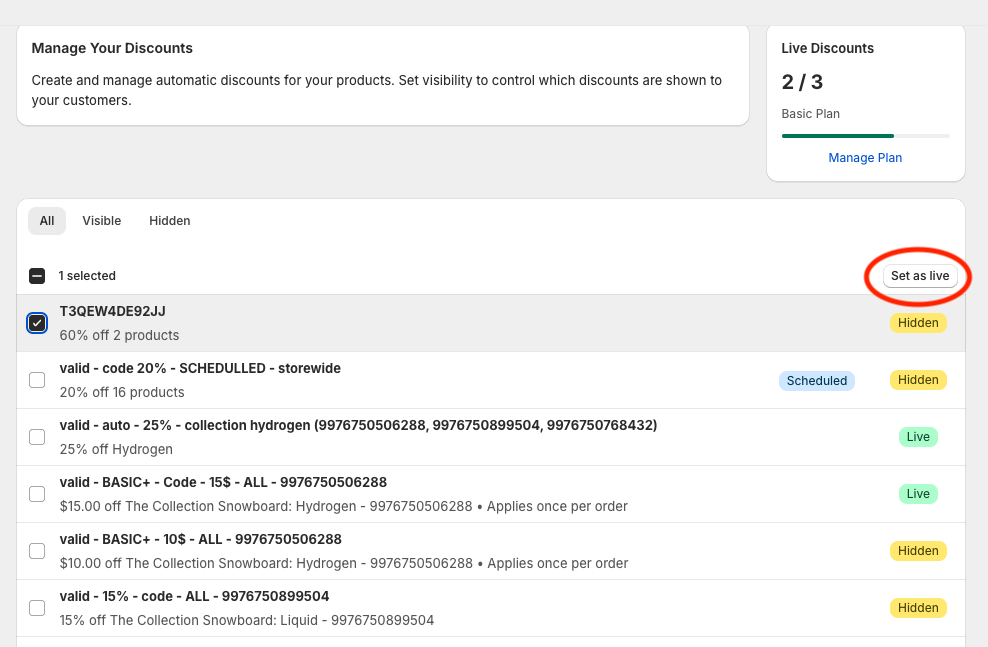
When discounts are imported into the app, they start as Hidden. You must set them to Live for them to appear on the storefront.
Step by step
- Go to Apps > Discounts Display Pro > Manage Discounts.
- Find your discount in the list.
- If it’s Hidden, select it and click Set to Live.
- Refresh your store page and check again.
Note: If the discount shows as Scheduled in our app, it will only appear once the start date is reached.
👉 For information on why some Shopify discounts might not appear in the app’s list, see Why Discounts Don’t Show in the App List.
3. Theme Compatibility & Selectors
The app works out of the box with most common Shopify themes. Check our Supported Themes list.
If your theme is heavily customized or not on the supported list, discounts may fail to display on product cards unless custom selectors are defined.
Step by step
- Try on a standard collection page—do any cards show discounts?
- If not, configure selectors in App > Settings > Advanced Theme Selectors.

👉 For details and working HTML examples, see Advanced Theme Support: Using Custom Selectors.
Still Stuck?
If you’ve checked these points and discounts still aren’t appearing. Contact our support team for assistance at support@wizardformula.pt or via the in-app messages.